Attachments
Step-By-Step:
Step 1: Select the EVENTS module from the module navigation menu. Then, click on Golf Outing Manager in the left-hand menu.
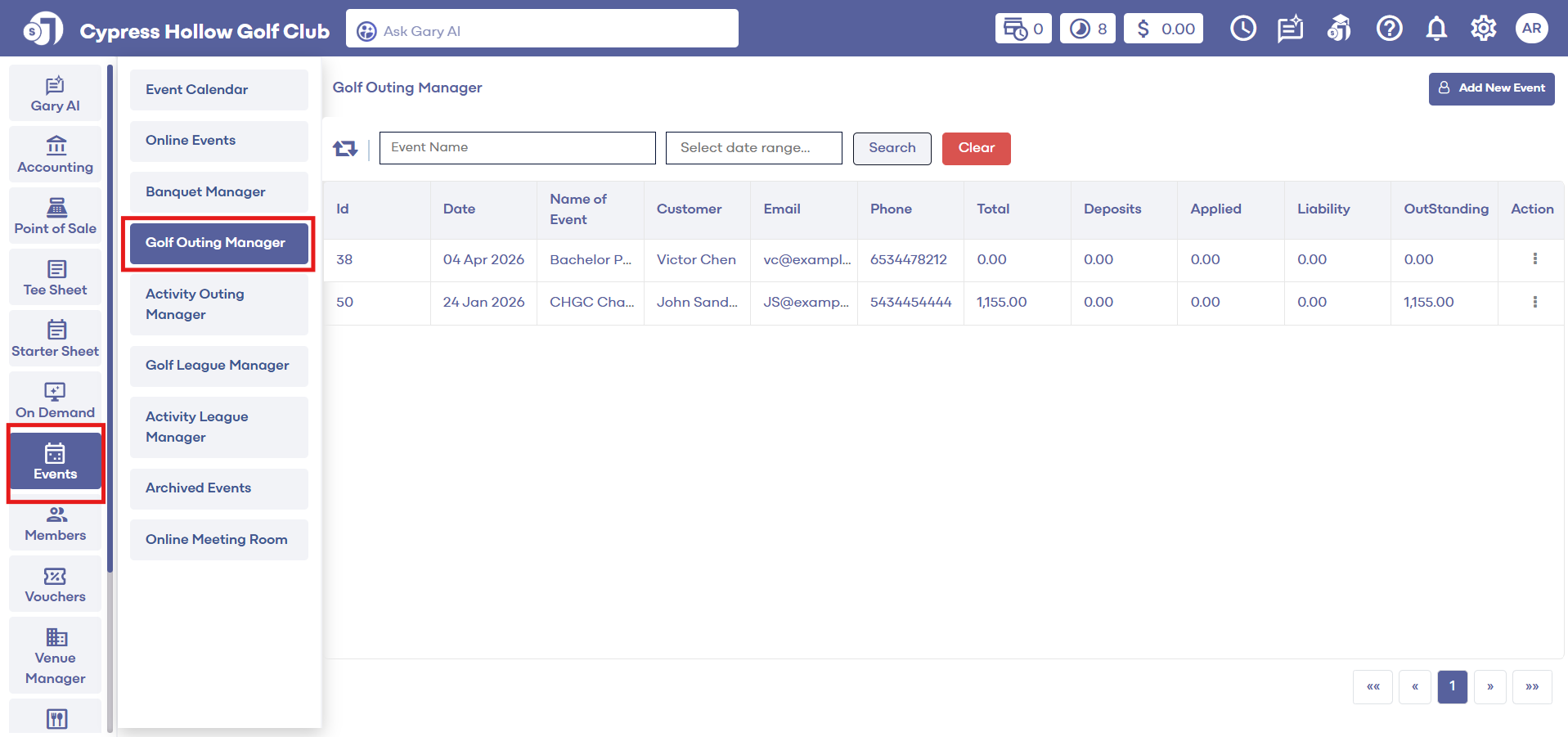
Step 1: Select the EVENTS module from the module navigation menu. Then, click on Golf Outing Manager in the left-hand menu.
Step 2: Search for the event to which you want to add an attachment. Under Action, click on the three small dots, followed by View/Edit. The system will generate an Edit Golf Outing Event pop-up window.
Step 3: Click on the ATTACHMENTS tab and then click on the Add Attachment button at the top right of the window.
Step 4: Select the desired attachment from the device and hit the Open button. This will attach the attachment to the Golf Outing Event.
Related Articles
Attachments
Article Contents: This article contains step-by-step instructions on how to add an attachment to a banquet event in the Banquet Manager. Step-By-Step: Step 1: Select the EVENTS module from the module navigation menu. Click on Banquet Manager in the ...Print Floor Plan
This article shows you how to print your floor plan for your events. Step-by-Step: Step 1: Click on Events module along the left column. Then, select the event, and within an event builder, click on the Floor Plan tab. Step 2: Once your floor plan it ...