Posted GL Transactions
Article Content: This article covers how to view all posted GL transactions. To access posted entries, go to the Posted GL Transactions tab under Ledger. This section allows users to review completed and finalized general ledger activity for accurate financial tracking.
To view all Posted GL Transactions, go to the Posted GL Transactions tab under Ledger:
From this screen you will be able to view GL transaction details by clicking the Detail Icon to the left of the
Source Code.
*Once GL transactions have been posted, you will not be able to make any changes*
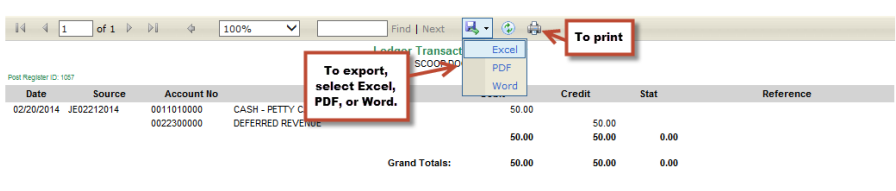
To print or export GL Posting Registers, click on the Printer Icon next to the Source Code. This will open your
Ledger Transaction Register in a new screen. From this screen you can print by clicking the Printer, or export:
To search Posted GL Transactions:
Related Articles
Recurring Transactions
Article Content: This article covers the use of Recurring Transactions, which are used to enter journal entries that post on a recurring basis with the same account and the same amount each time (permanent). To enter new Recurring Journal ...GL Transactions
Article Content: This article covers the use of the GL Transactions section, which allows users to enter General Journal entries, view entries available for posting, modify or delete unposted entries, and post completed transactions. Navigate to GL ...Posted Payments
Article Contents: This article Explains how to view and search posted payments in synergy accounting Step-By-Step: Step 1: Once you have confirmed that checks have printed successfully, they will be posted. Step 2: To view payment details, click on ...Due To / Due From
Article Contents: This articles contains instructions on how to set up and use Intercompany (Due To/ Due From) Processing in Accounts Payable. Intercompany processing allows you to pay an invoice from the entity company and automatically distribute ...Posted Invoices
Article Contents: This article explains how to view, sort, and search posted invoices in synergy accounting Step-By-Step: Step 1: To view Invoices that have been posted, you will go to the “Posted Invoices” tab: You will be able to view all Posted ...