Tag Management
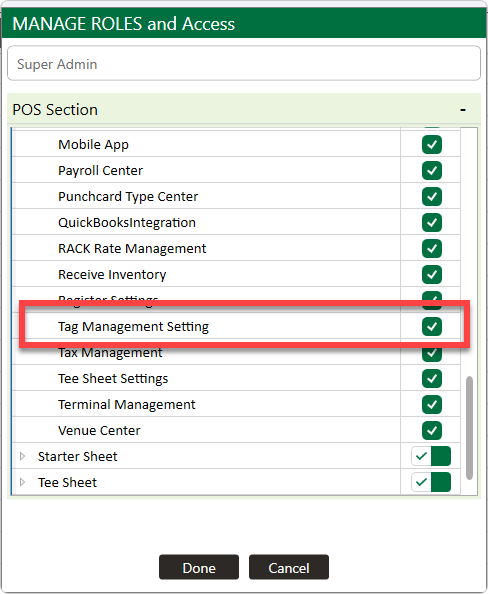
Step 1: Ensure that this settings is toggled in Permissions. - Settings > Mange Roles > Edit Permissions (under Action) > Settings > Toggle on Tag Management.
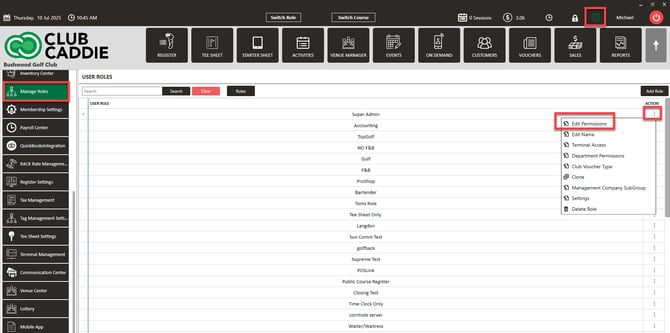
Step 2: Creating the Tag: First, navigate to Settings, and click on Tag Management. Then, click on Add Tag.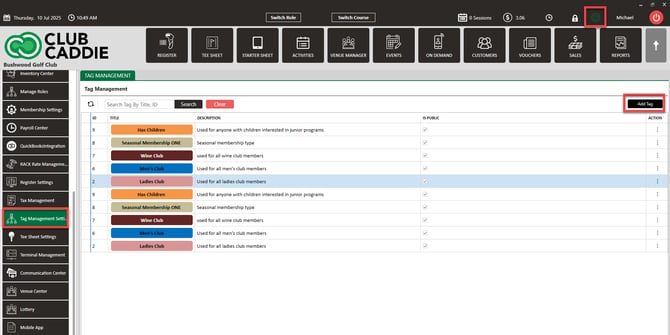
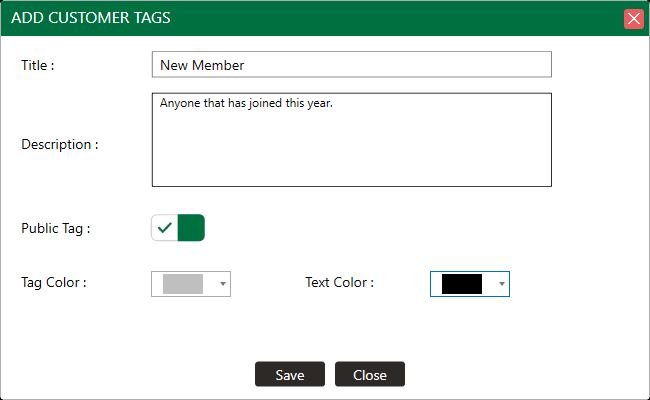
Step 3: In the pop-up, you will be able to create the name for the tag, choose if the tag is public or for internal purposes, as well as the color options. Once the information has been entered, click Save.
Step 4: Assigning Tags to guests: Open a guests profile, locate the Tag box, and select the desired Tags.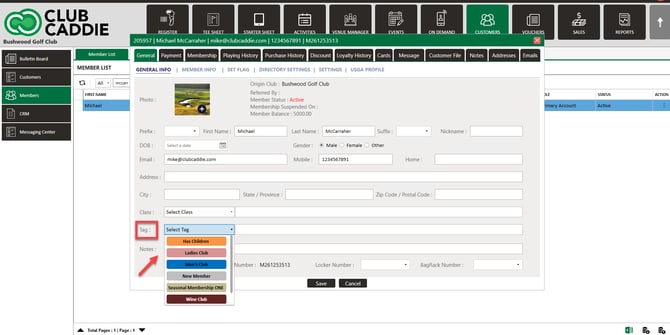
Tags allow operators to segment guests based on interests or behaviors and then market to those groups more effectively. Unlike classes (which control pricing and access), tags are designed for marketing and communication.
Tags are not a replacement for classes (yet). Use classes for billing and operational controls. Tags are for grouping and messaging. For example, if someone joins a “Wine Club” that meets every other Wednesday, tag them so they can be targeted in future promotions or newsletters.
Related Articles
Class Management
Article Contents: This is a step-by-step guide on how to create a new class or edit an existing class. Step-By-Step: Step 1: Click on the Gear Wheel icon on the top-right corner of the screen. Then click on Class Management from the left-side menu. ...Terminal Management
This offers a walk-through on adding additional terminals. With clear, step-by-step instructions, this tutorial simplifies the process of terminal creation, highlighting key features and providing practical examples. Learn how to personalize each ...Voucher Management Access
Article Contents: This article contains step by step instructions for enabling or disabling user role access to voucher management in the system. Step-By-Step: Step 1: Navigate to "Settings," and then select "Manage Roles." Click on the Action button ...Tax Management Overview
Article Contents: This article contains information on the tax management settings. Step-by-Step: Step 1: Click on the Gear Wheel icon on the top right corner of the screen. Then click on the Tax Management button from the left menu. Step 2: Adding ...Class Rate Management
Article Content: This article provides step-by-step instructions on how to set up Class Rates. Step-By-Step These are rates that are typically used for members. - For public rates, utilize Rack Rate Management. Step 1: Click on the Gear Wheel Icon on ...