Clover Refunds
Clover Refunds
Go to the Clover Dashboard and click Transactions on the left-hand side. Apply appropriate filters and locate transaction that needs to be refunded.
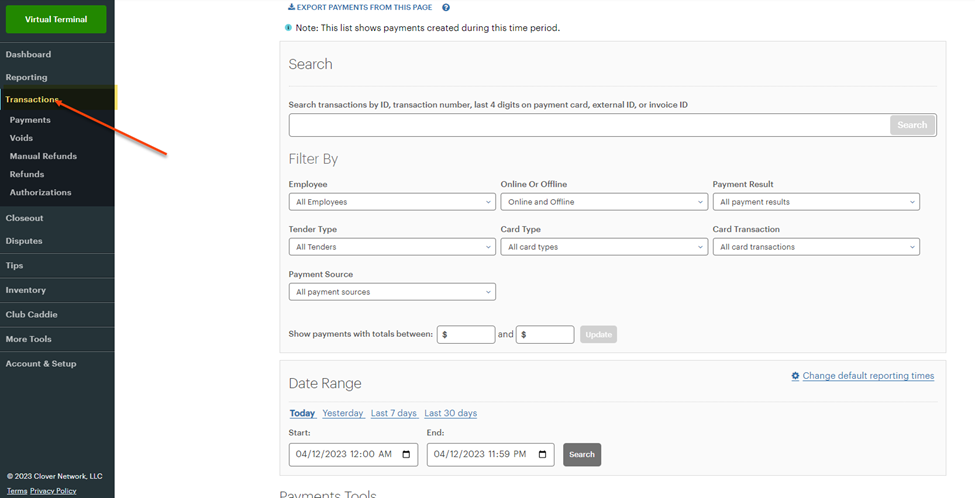
Go to the Clover Dashboard and click Transactions on the left-hand side. Apply appropriate filters and locate transaction that needs to be refunded.
Once transaction is located, click on Details.
Scroll to the bottom and click Refund.
Related Articles
Clover Mini
This article contains a direct link to and an in article direct access to the Clover Help Center. Visit the clover help center directly at: https://www.clover.com/en-US/helpClover Mini Activation
How to activate a Clover Mini Insert article:Clover Flex Activation
Please refer to the below steps for activating the Clover Flex device Insert article:Clover Flex Device Setup
Article Contents: This article contains a step by step guide on how to set up your Clover Flex device for Jonas Synergy. Step by Step: Step 1: Opening and Activating the Clover. First, let’s open and activate your Clover device: - Turn on Clover: ...Clover Flex User's Guide
Article Contents: This Clover Flex User's Guide provides an overview of the device's features, setup process, and troubleshooting. Overview The CardPointe Integrated Terminal solution now includes Clover Flex devices for US merchants. The Clover Flex ...