General : How Holding Accounts and Vouchers Interact with GL Code Reporting
Step 1: Deposit into Credit Book Holding Account.
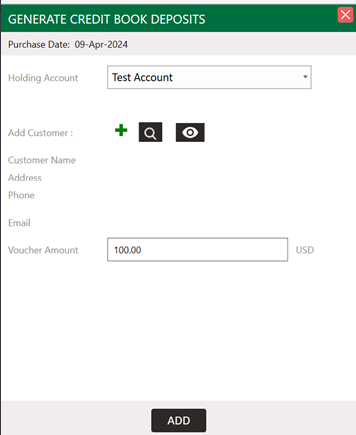
GL Code Report shows the following: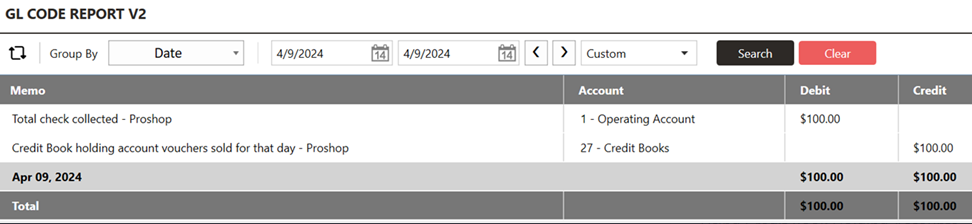
A) Type: Check Payment
Memo Note: Total Check Collected.
What is this? It is the $100 coming from the payment method check that I used to tender out the above order.
B) Type: Credit Book Holding Account Voucher Sale.
Memo Note: Credit book holding account vouchers sold for that day.
What is this? It is the $100 in credit being created in the holding account.
Step 2: Credit Book Holding Account Distribution to Individual Vouchers.
This should be looked at as the payment from the holding account to an individual credit book.
Example: I am going to distribute to 3 individual vouchers for $70, $20, and $10 for a total of $100. 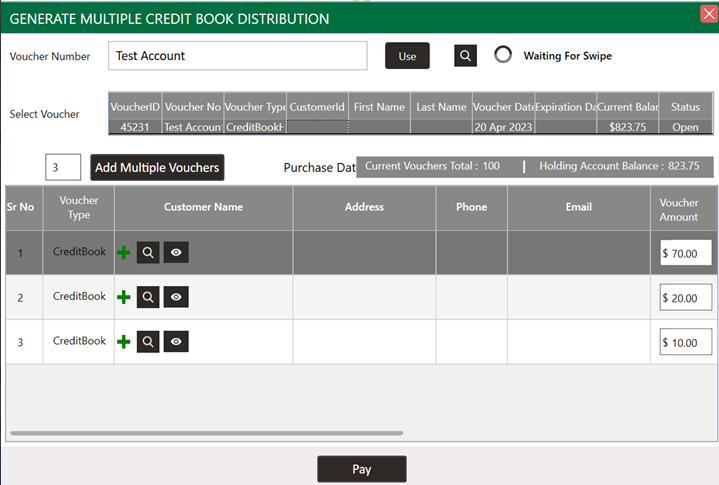
GL code report shows the following: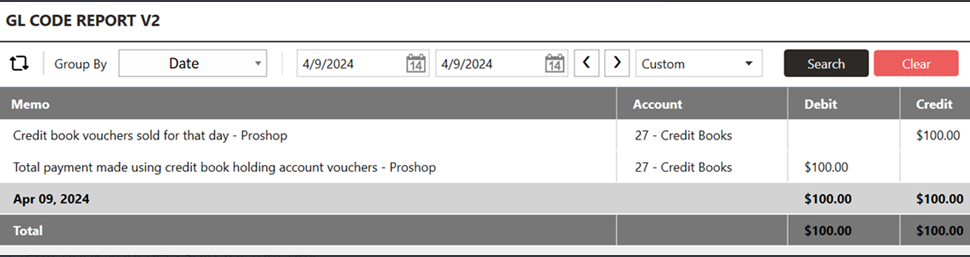
Memo Note: Credit book vouchers sold for that day
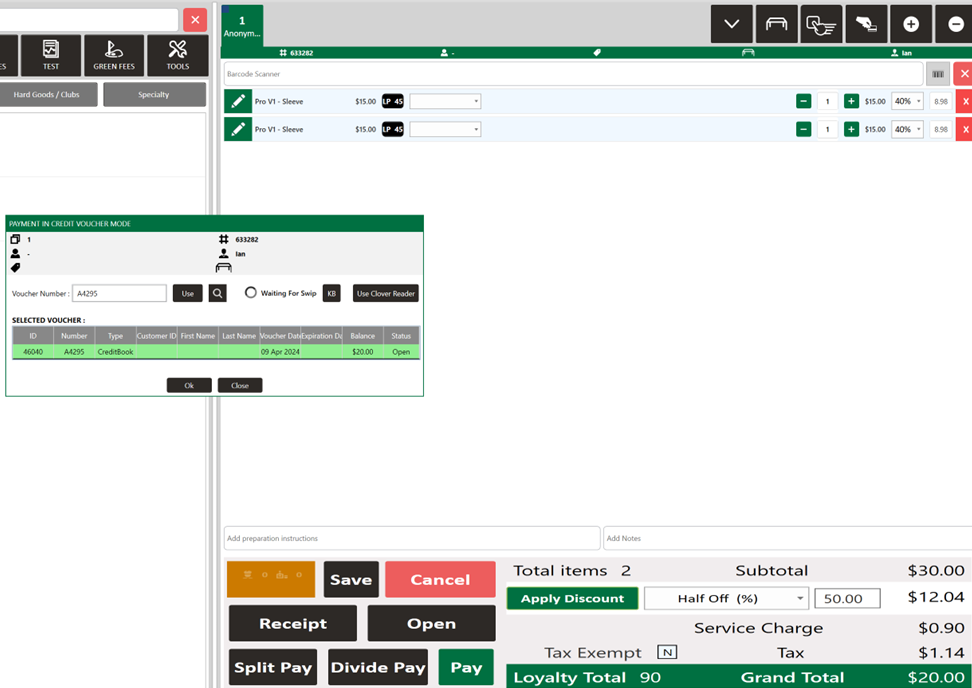
GL Code Report shows the following: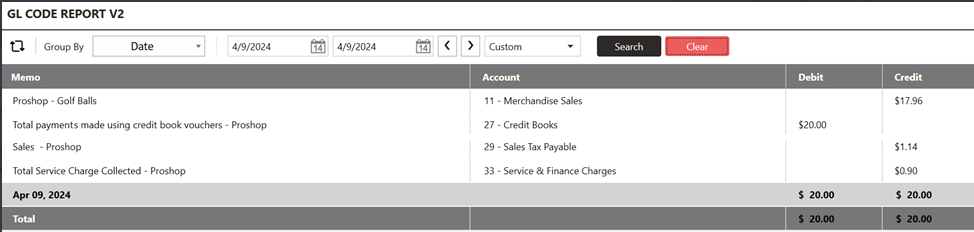
GL code report shows the following:
A) Type: Sub Department - Golf Balls
Memo: Pro-Shop Golf Balls
What is it? The merchandise portion of our sale
- B) Type: Credit Book Voucher Payments.
Memo: Total payments made using credit book vouchers
What is it? This is the $20 debit from the voucher reallocating to the Credit accounts listed in this transaction.
C) Type: Sales Tax Payable.
Memo: Sales Tax – Sales – Pro-shop
What is it? The tax portion of our sale.
D) Type: Service Charge
Memo: Total service charge collected pro-shop
What is it? The service charge portion of our sale if applicable.
Step 4: Deposit to Existing Vouchers.
If you are reloading a specific voucher utilizing the “Voucher deposit” option in the tools section of the register.
Example: I have gone ahead and created an order that is adding $100 to an existing credit book voucher and tendering out with the check payment type.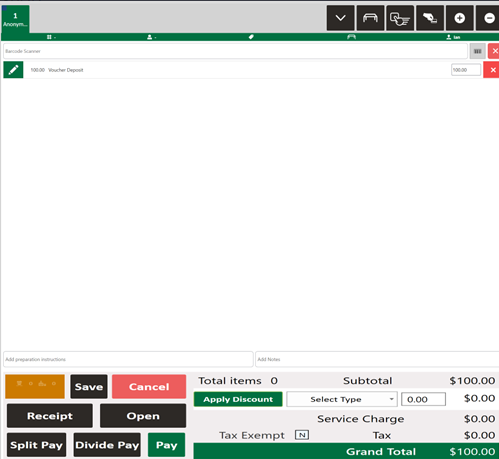
GL Code Report shows the following: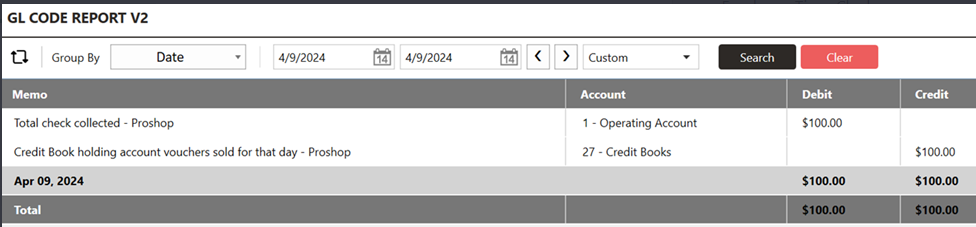
A) Type: Check Payment.
Memo Note: Total Check Collected.
What is this? It is the $100 coming from the payment method check that I used to tender out the above order.
B) Type: Credit Book Holding Account Voucher Sale.
Memo Note: Credit book holding account vouchers sold for that day.
What is this? It is the $100 in credit being created in the holding account.
Related Articles
General : Clocking In and Out
Article Contents: This article will guide you on the process of how to clock in and clock out within the software Step by Step Step 1: Access the Time Clock by clicking the clock icon in the top right-hand corner of your screen. Step 2: Enter your ...General : Understanding the General Info Tab (Video)
In this video, we will provide an overview of the General Info Tab:General : Setting Up a Business Domain for Email Sending
Article Contents: If you’re trying to send business emails using an @gmail.com address (e.g., [email protected]), this guide is for you. Learn why a custom domain is essential for compliance, deliverability, and professionalism. Why You Can't Use ...General : Sending Log Files
Article Contents: This article summarizes the steps on how to send log files. Note: When you are reporting issues, it may be necessary that the following log files be sent in order to dig into your request further. It is important to ensure that the ...General : Website Design Adjustment Requests
Article Contents: This article provides information on how golf courses that have had their websites designed by Jonas Synergy can request adjustments to their site. Step by Step Step 1: Identify the Need for Website Adjustments After your Jonas ...