PAX S300 : "POSLink.dll" Error
Step-By-Step:
Step 1: If you are receiving the following error on payment transactions:
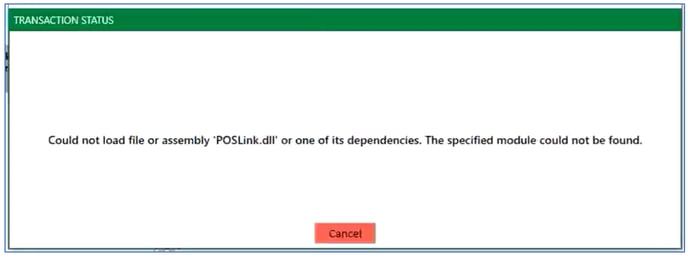
Step 2:Make sure the Microsoft Visual C++ 2010 Redistributable Package 64bit is installed or not.
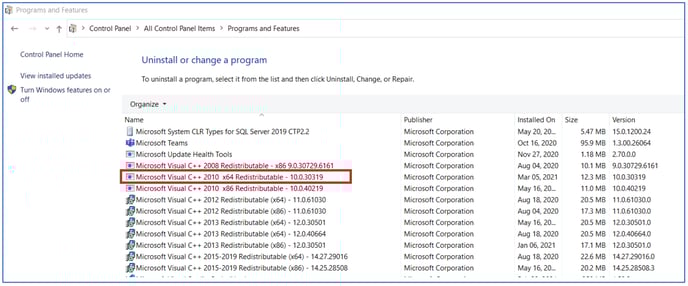
Step 4: Follow the install wizard to finalize the installation of Microsoft Visual C++ Redistributable and restart the computer terminal.
Step 5: Attempt a payment after installation.
Related Articles
Star Micronics : Error Lights
Article Contents: This article reviews the various error lights displayed by Star Micronics Printers. Step 1: Star Micronics Error Lights Power light Error light Beep code Issue description Recommended fix On On Continuous The top cover of the paper ...PAX S300 : Changing IP Settings
Article Contents: This article show how to change the IP settings on a PAX S300 credit card reader Step-By-Step: Step 1: First press the 1 and the F buttons simultaneously on the credit card machine. This will then display a password prompt screen. ...Epson : Printer Error Lights
Article Contents: This article explains how to diagnose problems with an Epson printer by checking the status of its lights, including the power, paper, ink, and Wi-Fi lights. Step-By-Step: You can often diagnose problems with your product by ...Ingenico Lane 3000 : PPS - 21 Invalid Merchant Error
Article Contents: This article provides guidance on addressing the "PPS - 21 Invalid Merchant" error encountered on payment terminals. Step-By-Step: Step 1: Identify the error message "PPS - 21 Invalid Merchant" on your payment terminal. Step 2: ...Installing Jonas Synergy on Windows 11 Home in S Mode
Article Contents: This article covers the steps on how to install Jonas Synergy on a Windows 11 laptop running in S mode, which initially only allows installations from the Microsoft Store. Step-By-Step: Step 1: Determine if your Windows 11 is ...