Hardware : Resolving Duplicate Signatures on the Clover Flex
Step-By-Step:
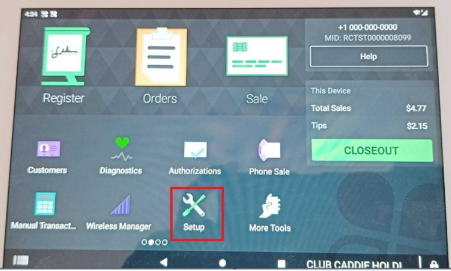
Step 1: Press the four corners of the device to navigate to the main page.
Next select Setup
Step 2: Select Payments
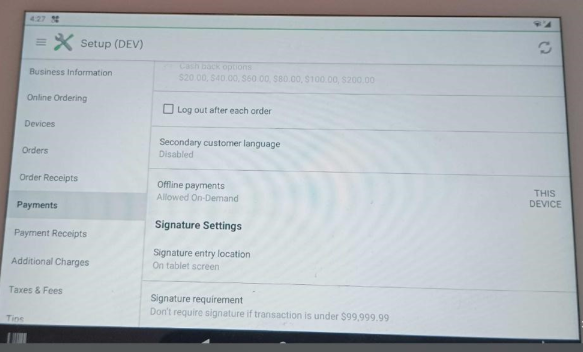
Step 3: Select signature requirements
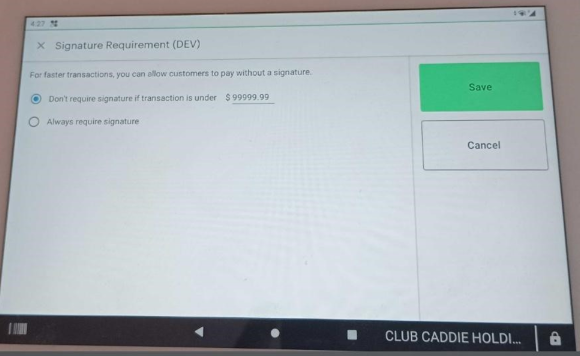
Step 4:You'll be given two options:
A) Don’t require signature if transaction is under $X. You can set this amount to avoid the signature requirement after payments. Set a value of $9999.99 to toggle off the signature capture.
And B) Always Require signature In that case clover device will ask every time signature after payments
Related Articles
Pairing a new Clover Device with Jonas Synergy
This article outlines the steps to pair a Clover device with Jonas Synergy. CLOVER INTEGRATION WITH JONAS SYNERGY GUIDE First you will want to ensure that the customer has activated the device and it is powered on and connected to Wi-Fi. Next you ...Using the Jonas Synergy App
Article Contents: This is a step by step guide on how to use the Jonas Synergy app on the Clover Flex. Step-By-Step: Step 1: Logging into the Jonas Synergy App. - Select Environment: Open the Jonas Synergy app and select the appropriate environment. ...Ingenico Lane 3000 : PPS - 21 Invalid Merchant Error
Article Contents: This article provides guidance on addressing the "PPS - 21 Invalid Merchant" error encountered on payment terminals. Step-By-Step: Step 1: Identify the error message "PPS - 21 Invalid Merchant" on your payment terminal. Step 2: ...Epson : Epson TM-m30II (Bluetooth) Receipt Printer Setup
Article Contents: This article covers the setup of a Epson TM-m30II (Bluetooth) Receipt Printer Requirements: To use this hardware with your Jonas Synergy system, you need to meet the following requirements: Where to buy the Epson TM-m30II receipt ...Epson : Epson TM-m30II (LAN) Receipt Printer Setup
Article Contents: This article provides instructions on setting up and installing the Epson TM-m30II (LAN) receipt printer for use with the Jonas Synergy system. Also covered in this article is the requirements, where to purchase the printer, how to ...