Register : Opening Cash Drawer
Step By Step
Step 1: Navigate to the REGISTER module from the top navigation bar
Step 1: Navigate to the REGISTER module from the top navigation bar
Step 2: To open the cash drawer, click the OPEN button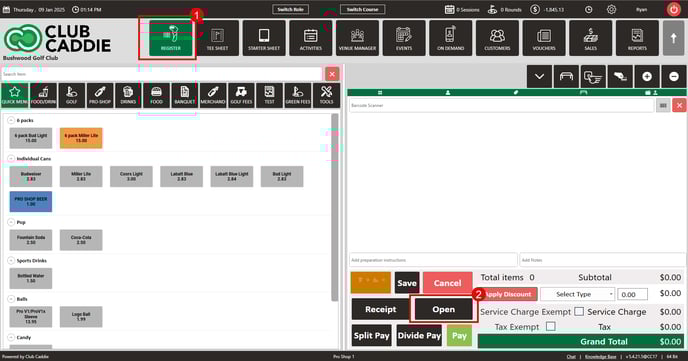
NOTE: The cash drawer will automatically open when you select the cash payment method.
Click Here for a step by step guide on configuring the cash drawer
Related Articles
Register : Open Button Functionality
Article Contents: This article contains step-by-step instructions on how to enable the 'Open' key if it does not already exist in the software settings or If the drawer does not open automatically when a cash sale is tendered. Step-By-Step: If the ...Register : Day End Closing
Article Contents: This article contains steps to effectively fill in all of the mentioned information to complete a Day End Closing. Step by Step Step 1: Click on the Register button on the header tab. On the Register screen, click on TOOLS tab. Step ...Register : Voucher Deposit from Register
Article Contents This article contains step-by-step instructions on how to do Voucher Deposit from Register. Step-by-Step: Step 1: Click on “Register” in the header tab, then click on the “Tools” tab. Step 2: Select the “Voucher Deposit” option. A ...Register : Edit Item Price
Article Contents: This article gives step-by-step instructions on how to change item prices in the register. Step-by-Step: Step 1: After selecting the REGISTER module, click on an item to add it to the register tab. Step 2: Item prices can be edited ...Register : Editing Item Quantity
Article Contents: This article gives step-by-step instructions on how to edit item quantities in the register. Step-By-Step: Step 1: After selecting the REGISTER module, click on an item to add it to the register tab. Step 2: Item quantities can be ...