Register : Scanning a Barcode
Step 1: Select the REGISTER icon (1) from the top navigation bar and then click into the Barcode Scanner box (2).
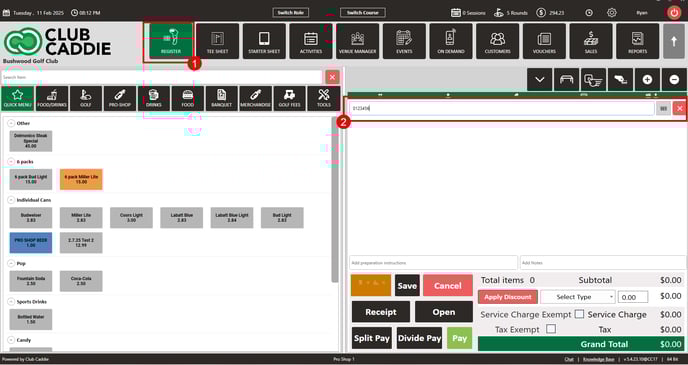
Step 2: Scan the barcode of any item from your inventory. The system will match the scanned barcode against the list in your inventory center to identify the respective item.
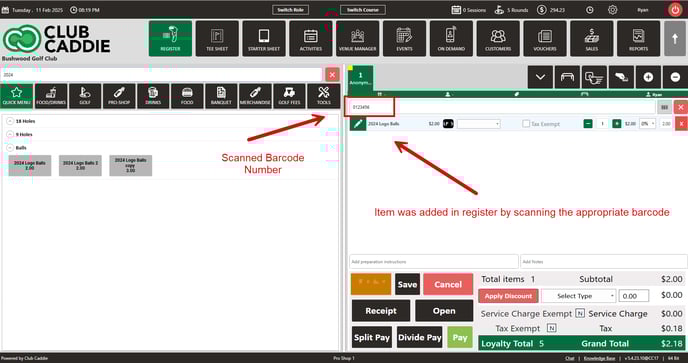
Step 3: If the system does not return a match by adding the item to the cart, it indicates that there is no item in the inventory center that matches the scanned barcode.
Note: Users can assign a barcode within Jonas Synergy or can use the manufacturers barcode on the item itself.
Related Articles
Register - Edit Inventory
Article Contents: This article gives step-by-step instructions on how to edit inventory. Step-By-Step: Step 1: Select the REGISTER module from the module navigation menu. Step 2: Right-click on the item in the register that is to be edited and click ...Register : Voucher Deposit from Register
Article Contents This article contains step-by-step instructions on how to do Voucher Deposit from Register. Step-by-Step: Step 1: Click on “Register” in the header tab, then click on the “Tools” tab. Step 2: Select the “Voucher Deposit” option. A ...Register : Edit Item Price
Article Contents: This article gives step-by-step instructions on how to change item prices in the register. Step-by-Step: Step 1: After selecting the REGISTER module, click on an item to add it to the register tab. Step 2: Item prices can be edited ...Register : Editing Item Quantity
Article Contents: This article gives step-by-step instructions on how to edit item quantities in the register. Step-By-Step: Step 1: After selecting the REGISTER module, click on an item to add it to the register tab. Step 2: Item quantities can be ...Register : Item Visibility
This article summarizes how to hide visibility of an item in the register Step By Step: Step 1: Navigate to the REGISTER module and locate the item that you are trying to hide from the register screen. Right click on the item and select EDIT ...