Viewing Recent Orders
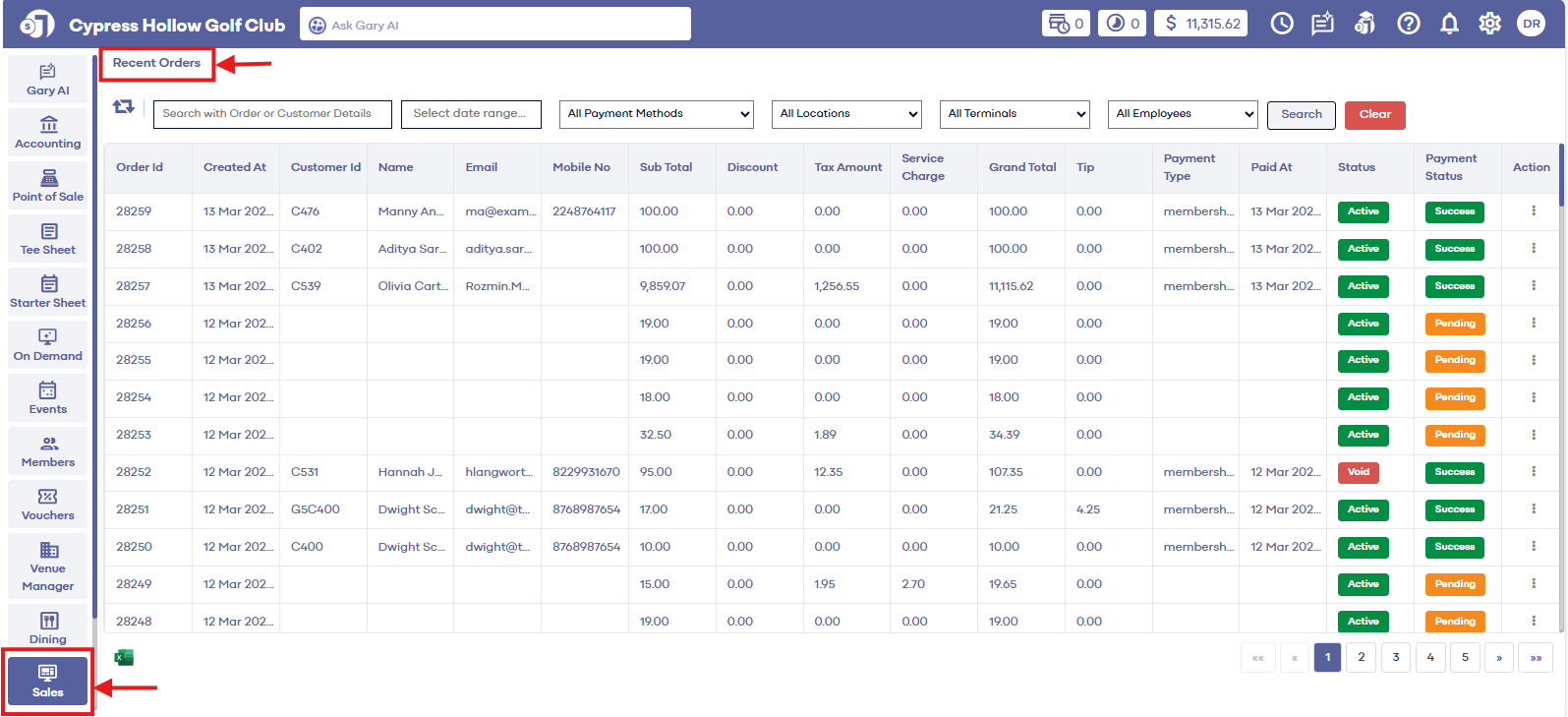
Step 1: Select the "Sales" module from the left pane menu. The system will display a list of all sales with the most recent sale being listed at the top.
Related Articles
Viewing Recent Orders
Article Contents: This article contains step by step instructions on how to view recent orders Step by Step Step 1: Select the "Sales" module from the left pane menu. The system will display a list of all sales with the most recent sale being listed ...Payment Status
Article Contents: This article gives step-by-step instructions on how to view a payment status in sales history. Step-By-Step: Step 1: Select the SALES module from the module navigation menu. The system will open a Recent Orders window. Step 2: In ...Receipt Reprinting
Article Contents: This article contains instructions on how to re-print sales receipts Step-By-Step: Step 1: Select the SALES module from the module navigation menu. Step 2: The system will generate a recent orders window. Click on the "Action" ...Date Filter
Article Contents: This article contains step-by-step instructions on how to filter sales by date. Step-By-Step: Step 1: Select the "Sales" module from the left pane menu where the software will display all orders with the most recent sale listed at ...Searching by order details
Article Contents: This article contains step by step instructions on how to view recent orders Step-By-Step: Step 1: Select the SALES module from the module navigation menu. Step 2: Enter the Order Id in the search field and click the Search button. ...