Step-By-Step:
Step 1: To check the balance, usage history, or make additional edits to your holding account's we can navigate to the "Voucher" module found in the left navigation bar. Next, select "Credit Book Vouchers" on the left-hand side and "Holding Account" in the top navigation bar.
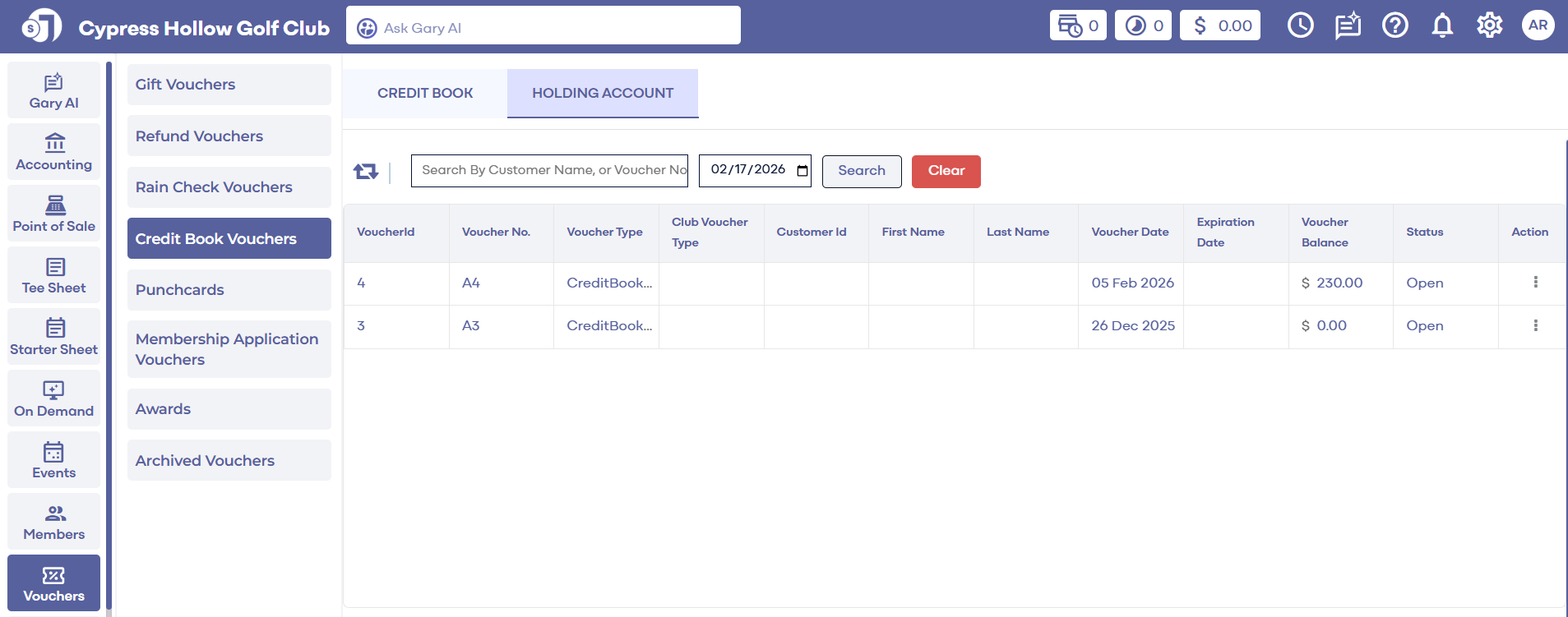
Step 2: All holding accounts will be displayed here. Under "Action" on the right hand side, there's the options to "Edit", "View" (Voucher's information) its "Usage" history (Voucher Ledger) and "Delete".
Step 1: To check the balance, usage history, or make additional edits to your holding account's we can navigate to the "Voucher" module found in the left navigation bar. Next, select "Credit Book Vouchers" on the left-hand side and "Holding Account" in the top navigation bar.
Step 2: All holding accounts will be displayed here. Under "Action" on the right hand side, there's the options to "Edit", "View" (Voucher's information) its "Usage" history (Voucher Ledger) and "Delete".