Add Custom Paper Size
Step 1: Search for and open Control Panel, and then click View devices and printers. Select the printer that is being cut off. Select Print Preferences then select Layout.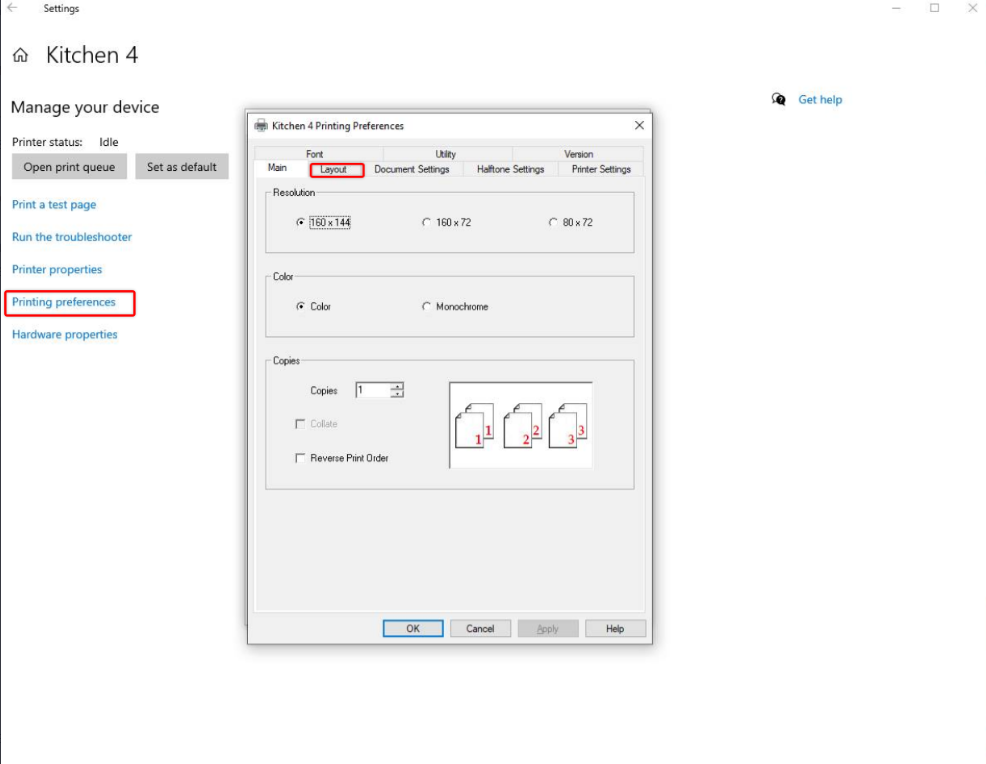
Step 2: Select User Defined Paper Size. It will open up a new window to define the new paper size. Depending on your printer model set the max printer width and set the maximum paper length to either the system defined max -3276mm- or a rough max length of ~3000 mm.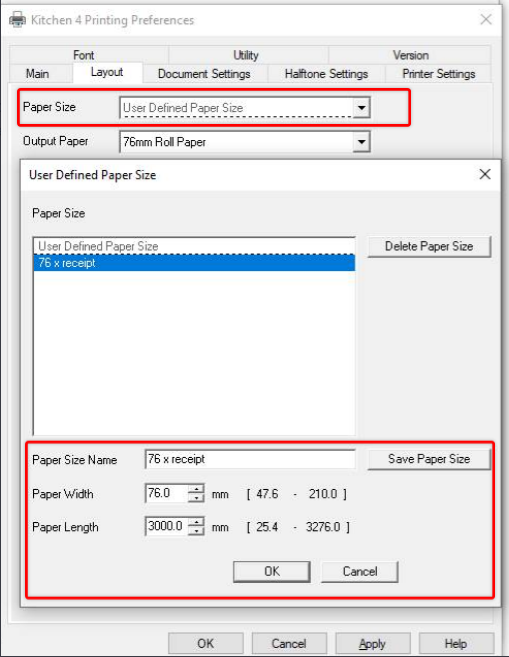
Step 3: After define the paper size name the preset and select Save Paper Size. Hit Apply and then Ok in printer preferences.
Step 4: (Steps 4-9 are for older systems Windows 7). Search for and open Control Panel, and then click View devices and printers. Click the icon for your printer, and then click Print server properties. NOTE:
If Print server properties is not available, right-click an empty area in the Printers window, select Run as administrator from the drop-down menu, and then select Server Properties.
Related Articles
Printer Paper Settings
Article Contents: This guide outlines the steps required to adjust the paper settings to use 72mm x receipt paper. Step-By-Step: Accessing Printer Settings Step 1: Open the Control Panel and left-click on “View devices and printers” under the ...Epson : Long Receipts Cutting Off in Windows
Article Contents: This article covers how to deal with long receipts cutting off for Epson printers. Step-By-Step: Step 1: Option 1 - Using the Control Panel. Click on the Start Menu and locate the Control Panel. From within the Control Panel, double ...Installing a Star TSP100
Article Contents: This article provides a step-by-step guide on installing a Star TSP100 receipt printer on Windows 8 and later versions. Step-By-Step: Step 1: Download the Driver 1. Visit the Star Micronics website before powering on your Star ...Long Receipts Cutting Off in Windows
Article Contents: This article will guide users through the process of configuring printer settings to prevent long receipts from being cut off Step-By-Step: Step 1: Open the Devices and Printers panel on the computer. The steps to access the Devices ...Star Micronics : Long Receipts Cutting off in Windows
Article Contents: This article will guide users through the process of configuring printer settings to prevent long receipts from being cut off. Step-By-Step: Step 1: Open the Devices and Printers panel on the computer. The steps to access the ...