Show the Built-In Touch Keyboard
Enabling the Touch Keyboard:
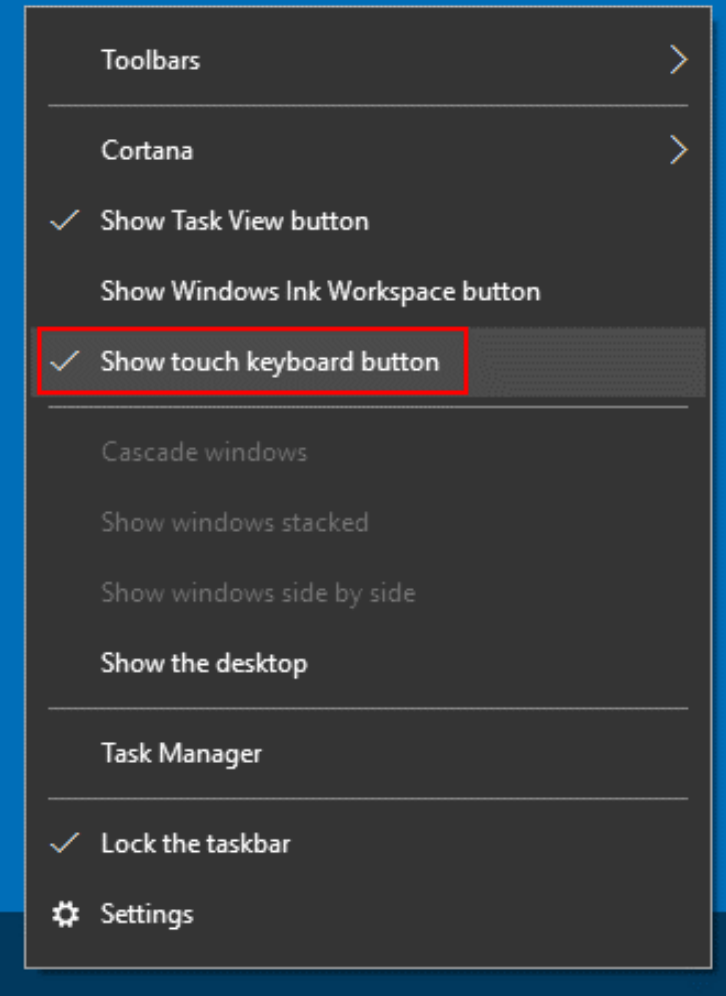
Step 1: Right-click an empty area on the Taskbar.
Step 2: From the context menu that appears, select the "Show Touch Keyboard Button" option to toggle it on or off. Ensure that there is a checkmark next to the "Show Touch Keyboard Button" option to enable the Touch Keyboard icon on the Taskbar.
Using the Touch Keyboard:
Step 3: Tap the Touch Keyboard icon located on the Taskbar.
Step 4: The Touch Keyboard will display on the screen. You can close it by tapping the "X" in the top right corner of the keyboard.
Related Articles
No Drag and Drop Touch in Google Chrome
Article Contents: This article summarizes no drag and drop touch within Google Chrome Step-By-Step: Step 1: Google has changed the way Chrome works with touch-based devices. Chrome will need to be launched with a shortcut that has the--touch-events ...How to Calibrate a Windows 10 Touch Screen
Article Contents: This article summarizes the steps needed to ensure your touch screen is calibrated. Step-By-Step: Step 1: Open the Control Panel and select Tablet PC Settings. Step 2: Or, hit the Windows key and type: calibrate and select the ...Switching a Magtek from Keyboard to HID Mode
Article Contents: This portion summarizes how to Configuration on Your Magtek MSR from Keyboard Emulation to HID. Step-By-Step: Step 1 : Sometimes it is necessary to change the configuration on your mag stripe reader to HID so that it will work with ...PAX S300 : Changing IP Settings
Article Contents: This article show how to change the IP settings on a PAX S300 credit card reader Step-By-Step: Step 1: First press the 1 and the F buttons simultaneously on the credit card machine. This will then display a password prompt screen. ...Surface Go Recommended Settings
Article Contents: This article includes the recommended settings for setting up your Surface Go device. Step-By-Step: Step 1: Download and install Jonas Synergy. Right Click - Pin to Start Right Click - Pin to Taskbar Step 2: Right Click on Desktop - ...