Legal Business Name / Tax ID Change
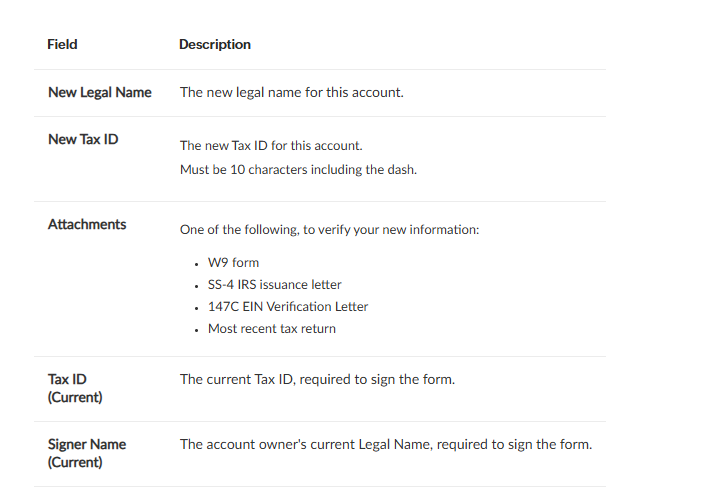
Users must select the "Legal/Tax ID" ticket reason and provide the new legal name, new 10-character Tax ID, and a verification document. The current Tax ID and account owner's legal name are also required for signing the form.
To request a legal business name or tax ID change, select the Legal/Tax ID ticket reason when starting a new ticket.
The Legal/Tax ID ticket includes the following fields:
Related Articles
DBA Name Change
This article contains information about changing the DBA (Doing Business As) name for a Cardconnect account. It outlines the specific fields required when submitting a DBA Name Change request ticket, including the new DBA name, tax ID, last 4 digits ...How to Update Sales Tax Percentages
Article Contents: When your local sales tax rate changes, you’ll need to update Jonas Synergy to make sure new transactions charge the correct amount. This article walks you through creating a new tax type and applying it to your inventory items. ...Updating Sales Tax Rates For California Courses 2026
California sales tax rates change periodically as local district taxes are approved or extended by voters. When rates change, you’ll need to update Jonas Synergy before the effective date to make sure your transactions are charging the correct ...Tax Management Overview
Article Contents: This article contains information on the tax management settings. Step-by-Step: Step 1: Click on the Gear Wheel icon on the top right corner of the screen. Then click on the Tax Management button from the left menu. Step 2: Adding ...Merchant Account Updates
This article explains how to update merchant account information in the CardConnect system by creating a support ticket. It covers various types of changes, including bank account, legal name/tax ID, DBA, and demographic information updates. The ...