Cancel Confirmation

Cancel Confirmation

Article Contents: This article contains step-by-step instructions on sending cancel confirmation.

Step-By-Step:

 
Step 1: Select “Tee Sheet” from the main menu.

Step 2: Right click on the booking you would like to cancel.

Step 3: Select " Cancel".

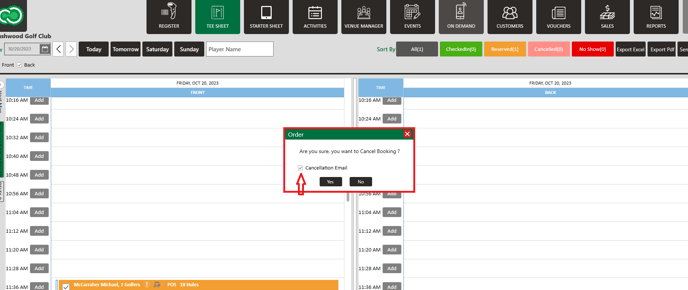
Step 4: A pop-up window will display and to send a cancel confirmation, make sure  the box is checked next to " Cancellation Email". Select "Yes" to cancel the booking.


    • Related Articles

    • Booking Confirmation

      Article Contents: This article contains step-by-step instructions on sending a booking confirmation. Step-By-Step: Step 1: Select “Tee Sheet” from the main menu. Step 2: Select the day and time you wish to book. Step 3: Once you have entered the ...
    • Cancel a Tee Time

      Article Contents This article contains a step by step guide on canceling or deleting a tee time from the Jonas Synergy tee sheet. Step-By-Step Step 1: Navigate to the tee sheet module from the top navigation bar. Step 2: Locate the tee time ...
    • Repeating Tee Times

      Article Contents: This article contains information on how to repeat tee times. Step-By-Step Step 1: Navigate to the TEE SHEET module from the top navigation bar. Step 2: Check the box of the desired reservation / booked tee time from the Tee Sheet ...
    • Switching Between Courses

      Article Contents: This Article Provides Step-By-Step Instructions On How To Allow Staff To Toggle Between Different Golf Courses (E.G., Championship 18, Executive 9) While Preserving Tee Sheet Variables Unique To Each Course. Understanding The ...