Fiscal Years
Article Contents: This article covers creating new fiscal years, adding past years, and setting up use tax codes, terms, payment types, and vendor types.
Step-By-Step:
As part of the Year-End Procedures, you will need to create a new fiscal year.
Step 1: Go to Company Setup, Fiscal
Years, New:
Step 2: The periods will automatically generate. If you need to add a past fiscal year, enter the year and “Propagate
Year”. Save and Close to add.
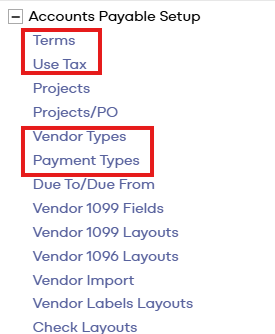
Step 3: New Use Tax codes, Terms, Payment Types, and Vendor Types can also be added under System Setup:
Related Articles
Account Plans
Article Content: Overview of creating, editing, and applying number formats to control decimal places, currency symbols, negative number styles, and separators in financial reports The Account Plans report allows you to review budget and forecast ...Verify 1099 Fields
Article Contents: how to view and verify 1099 fields for accurate IRS reporting. This screen defines all field IDs and descriptions used when generating 1099 forms for vendors. Step-By-Step: Step 1: Go to System Setup → Accounts Payable Setup → ...Chart of Accounts
Article Content: This Article Contains Information On Creating, Maintaining, And Modifying The Chart of Accounts For a Property. To Access The Chart of Accounts Maintenance Screen, Go To Ledger → Chart of Accounts. All Accounts, Balance Sheet and ...Account Plans
Article Contents: This article covers how to add or edit budgets/forecasts, upload monthly or daily files, use the "spread amount evenly" option, and update account totals. Step-By-Step: Step 1: To add or edit Budgets/Forecasts, go to Planning - ...