Assign Member Classes
Step-By-Step:
Step 1: Select the members module from the module navigation menu. Here you will see a list of all the members.
Step 2: Click on the Guests tab. Then select the guest you wish to assign a class.
Step 3: Under the General tab, click on the Member Info tab. Then select the class from the drop-down next to Membership Class.
Step 4: The system will open a MEMBERSHIP CLASS window containing the Effective date and Expiration date, and an option to pay this class by charge account.
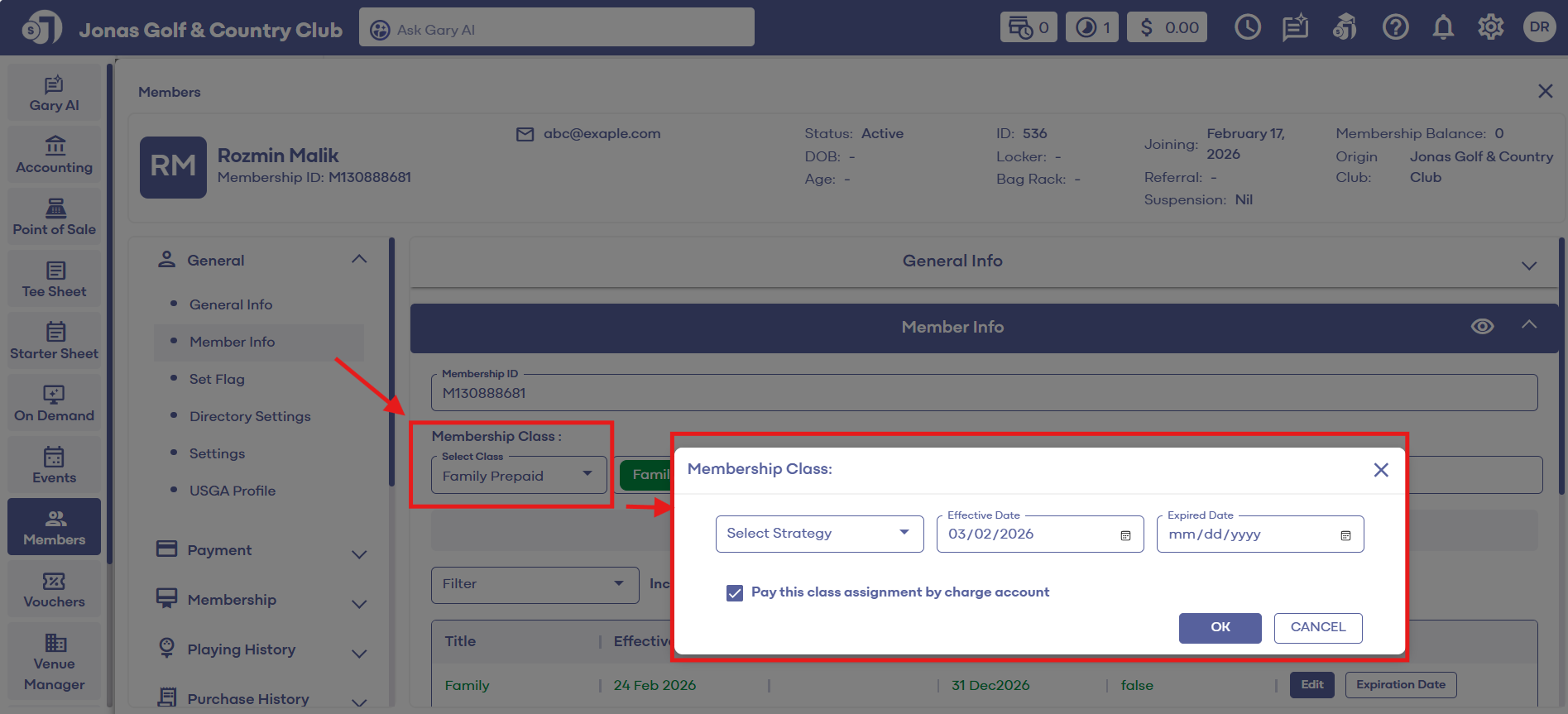
Step 5: A newly assigned member class will now show in the Member Classes List section. Click on the Save button to save the changes for the member.
Click here for more information regarding expiration dates, bill til dates, and charge accounts.
Related Articles
How to Suspend & Restore a Member
This article contains step-by-step instruction on how to suspend / restore a member using the Jonas synergy Software Kindly note that suspending a member does NOT halt billing. To discontinue billing, an expiration date must be set on the Guest ...Bulk Expiring Member Classes
In this article we will cover how to bulk expire a particular membership class. In this example we will isolate the social membership types and set an expiration date. Step-By-Step: Step 1: Navigate to the Guest's tab within Jonas Synergy and then to ...Registering for the Member Portal
This article provides steps to registering for the member portal Registering for the Member Portal: If it is your first time logging in, and your club has not already provided you with a pre-set password please follow the instructions below from step ...Display Members Discounts on Inventory Labels
This Article Explains How To Display Member Discounts Directly On Inventory Labels In Jonas Synergy. Enabling This Feature Allows Both Staff And Customers To Clearly See The Discounted Pricing Available To Members, Helping Promote Transparency And ...Member List
Article Contents: This article contains a step-by-step guide on how to view your member list. Step-By-Step: Step 1: Click on the Members Tab on the left pane. Step 2: Click on the Members button on the left side of the window to go to the member ...