Un-Checkin a Tee Time
Step 1: If you don't know how to check in a golfer or tee time, please click here to be taken to a separate article.
Step 2: To un-checkin tee-time, you need to navigate to the "Tee Sheet" module using the top navigation menu. Next, locate the desired tee-time that is already checked in and right-click on it. In the subsequent drop-down menu, there will be an option to "Uncheckin" the booking.
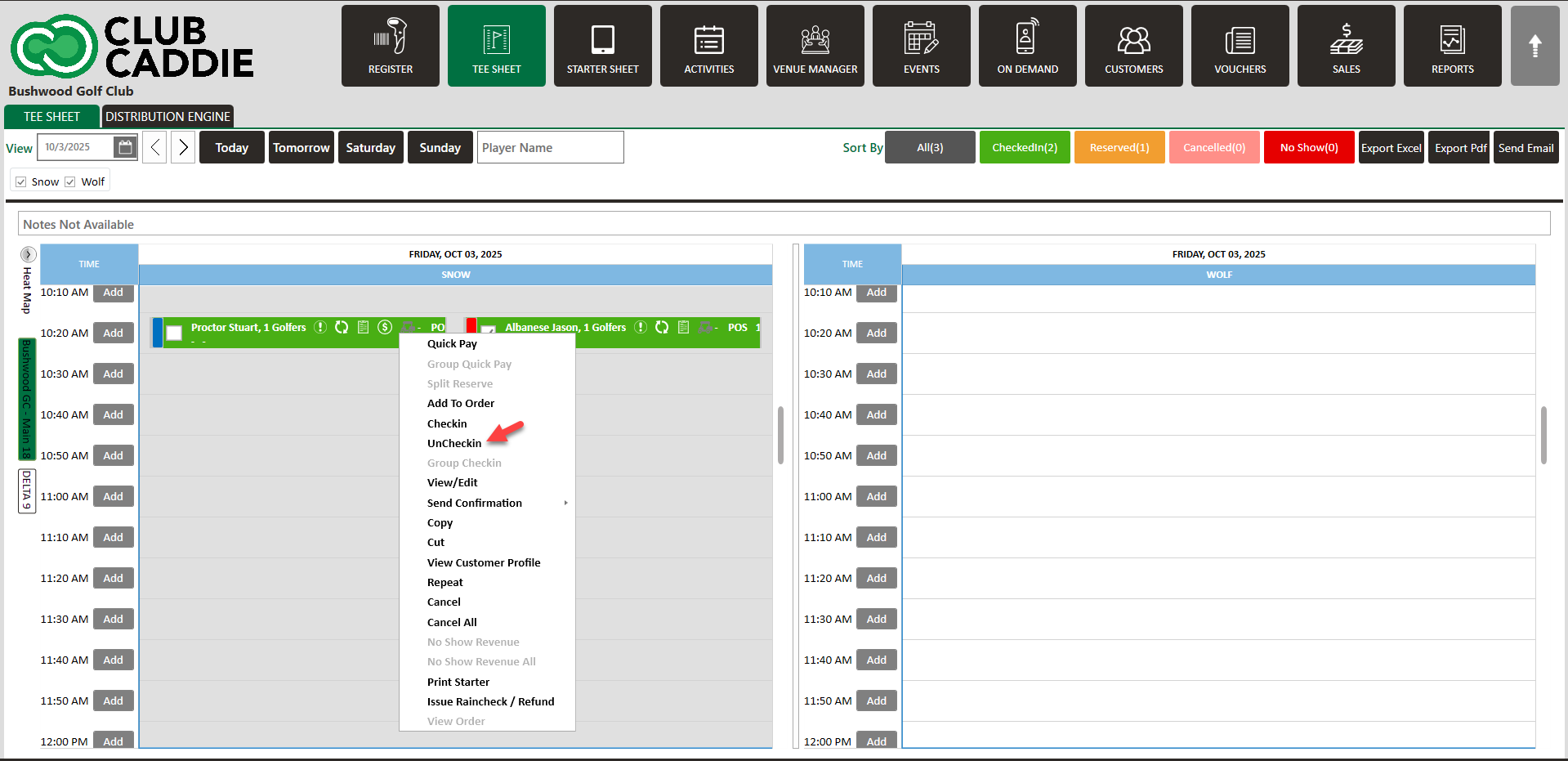
Step 3: The reservation will be moved from the checked-in status back into the reserved status and you will be able to edit the booking details.
Please note that once the guest has paid, you must provide a refund before you are able to un-checkin. Article on refund from tee sheet - click here.
Related Articles
Move a Tee Time
Article Contents: This article contains step-by-step instructions on how to move a tee-time from one time slot to another using two different methods. Step-By-Step: Method 1: Drag-and-Drop Method Step 1: Click on "TEE SHEET" on the top menu. Then, ...Cancel a Tee Time
Article Contents This article contains a step by step guide on canceling or deleting a tee time from the Jonas Synergy tee sheet. Step-By-Step Step 1: Navigate to the tee sheet module from the top navigation bar. Step 2: Locate the tee time ...Edit Tee Time
Article Contents: This article contains step by step instructions on how to edit a tee booking through the tee sheet. Step-By-Step Step 1: Access the TEE SHEET tab from the main menu. Step 2: Locate and select the reservation on the Tee Sheet. Step ...Check In Tee Time
Article Contents: This article contains a step-by-step guide on how to check-in a tee-time. Step-By-Step Step 1: Click on the TEE SHEET tab from the main menu (1). Step 2: Find and select the reservation from the Tee Sheet (2). Step 3 (Option a): ...Reserve A Tee Time
Article Contents: This article contains step-by-step instructions on reserving a new tee time within the tee-sheet module. Step-By-Step Step 1: Select “Tee Sheet” from the main menu. Step 2: The default date selection will be today's date. If you ...