Search by Player Name

Search by Player Name

Article Contents: This article contains information on how to search by a player's name.

Step-By-Step

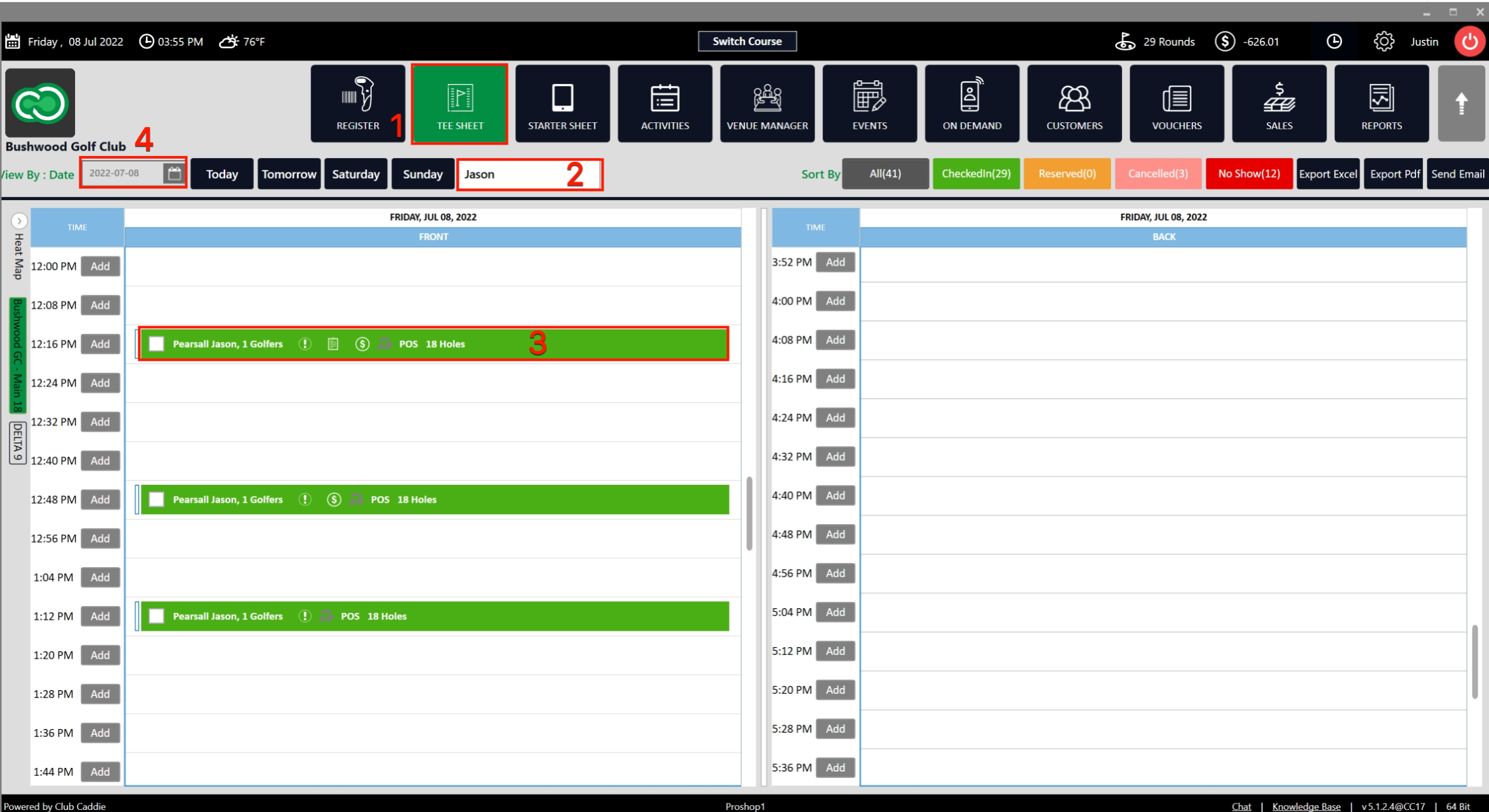
Step 1: Navigate to the  TEE SHEET  module from the top navigation bar (1).


Step 2: Near the Select Current Date button you will find the Player Name Search Box (2).

Step 3: Fill in the player name you want to check the Tee Sheet for on the current date (2). Once you fill in the name, the tee sheet will show the Reservation Time Slot for that particular player (3).

Step 4: You can also select other dates from View By Date (4) and then fill in the Player Name Search Box. The tee sheet will show the reservation time slot for that particular player and date.
    • Related Articles

    • Reserve A Tee Time

      Article Contents: This article contains step-by-step instructions on reserving a new tee time within the tee-sheet module. Step-By-Step Step 1: Select “Tee Sheet” from the main menu. Step 2: The default date selection will be today's date. If you ...
    • Add Guest to Group Reservation

      Article Contents: This article contains step-by-step instructions on how to add a Guest to a group booking. Step-By-Step: Step 1: From the module navigation menu, select the TEE SHEET module. Step 2: Right-click on the desired time slot and select ...
    • Shotgun Starts

      Article Content: Shotgun Starts Are The Go-To Setup For Tournaments And Large Groups When You Want Multiple Foursomes Starting At The Same Time Across Different Holes. The System Will Automatically Calculate The Number Of Tee Times Required, Assign ...
    • Google Bookings

      Article Content: This Article Explains How Golf Clubs Should Provide And Verify Their Business Information For Onboarding With Reserve With Google (RwG). All Data Must Be Accurate, Valid, And Aligned With The Club's Google Business Profile. ...
    • Multiple Guest Check In

      Article Contents: This article contains information on how to make Group Check In into tee sheet. Step By Step: Step 1: Go to the TEE SHEET module and select the time slot. Step 2: Select the players listed on the time slot. Check on the boxes on the ...